

Cabins USA Availability Search Icon Availability Search Small Icon

Pigeon Forge Restaurant: Storming Crab

Area Info : Where To Eat : Restaurants : Storming Crab in Pigeon Forge

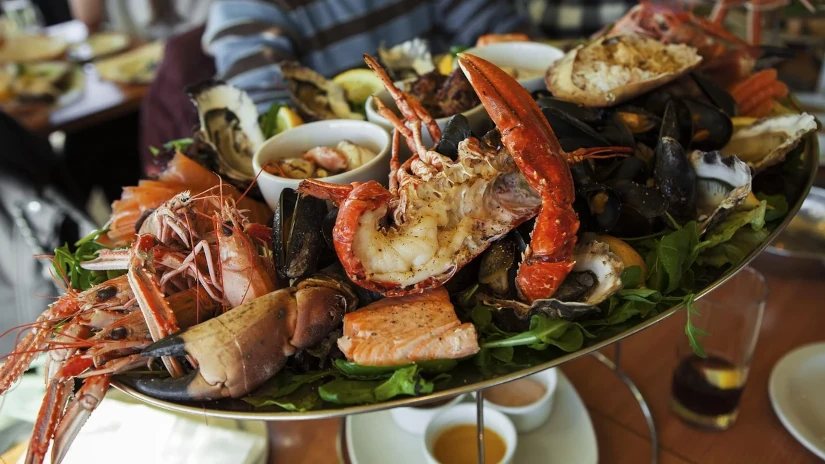
Indulge your love of Cajun seafood on your next vacation by swinging by Storming Crab in Pigeon Forge for crab, mussels, and other favorites. After eating, the rest of Pigeon Forge is at your fingertips, thanks to a location on the Parkway.

About Storming Crab

The team behind Storming Crab has only one mission, which is to provide the yummiest, messiest, Cajun seafood in the Smoky Mountains. Fortunately for visitors, they more than deliver. You'll need napkins and you'll make a mess, but you'll leave and head back to your cabin rental completely satisfied.

The best part about this seafood restaurant in Pigeon Forge? The menu is diverse, ensuring everyone finds something to enjoy, making this restaurant family-friendly while providing the right vibe for a night out with friends.

So Many Menu Options Available

Are you extremely hungry? Do you just want a few bites? You're in luck since there are so many options available on the menu.

Appetizers

Nothing kicks off a meal or a love for snacks more than a few rounds of appetizers. Some yummy choices include:

  • Seafood Bread
  • Crab Cakes
  • Mozzarella Cheese Sticks
  • Clam Strips
  • Boudin Balls
  • Stuffed Jalapenos
  • Fish Sticks
  • Fried Okra

Appetizer Sampler: Includes Jalapeno, Boudin Balls, Cheese Sticks, Onion Rings, Fish Sticks, Okra, and Hush Puppies.

Fried Baskets

If you love fried food and want to go all-in, consider grabbing one of these:

  • Calamari
  • Gator Meat
  • Soft Shell Crab
  • Chicken Strips
  • Fried Shrimp
  • Fried Oyster
  • Fried Catfish
  • Fried Scallops
  • Fried Cod Fish

Soups and Rice

Excellent comfort options, especially on a cold night:

  • Gumbo Rice
  • Crawfish Etouffee
  • Clam Chowder
  • Cajun Fried Rice
  • Steamed Rice

Side Options

Sides make the meal and the people at Storming Crab know that. Plenty of options include:

  • Fries
  • Broccoli
  • Coleslaw
  • Fried Okra
  • Onion Rings
  • Red Potatoes
  • Steamed Rice
  • Hush Puppies
  • Cheese Sticks
  • Corn on the Cob
  • Sweet Potato Fries
  • Seafood Bread

Po' Boy

For those who love sandwiches:

  • Gator Meat
  • Chicken
  • Fried Shrimp
  • Fried Oyster
  • Catfish

All sandwiches come with fries. Choice of sauces include ranch, lite mayo, honey mustard, or chipotle.

Seafood

The main feature of this eatery is the seafood itself. Pounds of meat await you with these yummy options:

  • Blue Crab
  • Lobster
  • Crawfish
  • Scallop
  • Lobster Tail
  • Black Mussel
  • Green Mussel
  • Shrimp Head-on
  • Shrimp Head-off
  • Brown Clam
  • White Clam
  • King Crab Legs
  • Snow Crab Legs
  • Dungeness Crab Legs

Combos Available: You can get lunch or dinner combos, which include multiple meats and sides. This is for the truly hungry.

Kids' Menu

Perfect for little ones or those not quite into seafood:

  • Fish Sticks
  • Fried Shrimp
  • Cheese Sticks
  • Chicken Nuggets
  • Fried Mac & Cheese

Dessert

Save room for dessert:

  • Tiramisu
  • Ice Cream
  • Cheese Cake
  • Chocolate Cake

Hours of Operation

  • Sunday: 11:30 AM – 9:00 PM
  • Monday: 11:30 AM – 9:00 PM
  • Tuesday: 11:30 AM – 9:00 PM
  • Wednesday: 11:30 AM – 9:00 PM
  • Thursday: 11:30 AM – 9:00 PM
  • Friday: 11:30 AM – 10:00 PM
  • Saturday: 11:30 AM – 10:00 PM

Final Thoughts on Storming Crab in Pigeon Forge

If you love Cajun food, seafood, or a combination of the two, then Storming Crab in Pigeon Forge is a must-add to your vacation plans. If you can't finish your meal, grab it to go and eat it later in our rental cabins in Pigeon Forge.

Contact:

Storming Crab
2794 Parkway
Pigeon Forge, TN 37863
865-446-2026

Please Note: Cabins USA LLC's, hereinafter referred to as Cabins USA, area information, area events, and blog pages are provided as a public service. Cabins USA does not endorse any of the products, vendors, consultants, or businesses referenced in these web pages. Any mention of vendors, products, businesses, or services on the Cabins USA web site is for informational purposes only. Users of this web site are responsible for checking the accuracy, completeness, currency and/or suitability of all information. The inclusion of this information does not imply endorsement by Cabins USA. Furthermore, specific questions regarding any content should be directed to the appropriate organization and not necessarily to Cabins USA.

Cabins USA Official Logo
star star star star star
2140 Parkway
Pigeon Forge, TN  37863
(865) 429-4121

VLS #157
Pigeon Forge Cabins
Guest Reservations
(800) 583-6168
2 Night Minimum


Cabins USA Help Icon
Copyright 2013-2025, Cabins USA LLC, Pigeon Forge, TN

Welcome to Cabins USA! We hope you enjoy your stay with us and look forward to helping you make incredible vacation memories. To help you navigate your Guest User account, we've provided a helpful guide to walk you through the process.

Creating an Account

Creating a guest account is as simple as submitting your email and creating a password. Keep in mind the email used to create your guest account must match the email provided on your reservation.

If a different email is on your reservation, you'll need to create a guest account with that email to manage the reservation.

When finished, an email will be sent to confirm your email address. Follow the steps in the email to complete the creation of your account.

Note: If you need to change the email address on your reservation, please contact the reservations office for further assistance.

Managing Your Account

Once your account is created, you can start managing your reservations. Your guest reservations will show as follows:

Click on the view button to get more details about each reservation. Within the reservation, you'll be able to do three things, which are:

Submit a Trouble Ticket

Click the report issue button for maintenance needs or other concerns during your stay. Briefly describe your issue, provide contact information, and submit up to 3 photos detailing your situation if applicable.

Submit Cancellation Request

This must be done before check-in and per our policies. Within the request, provide a reason for cancellation and click submit. After submitting your request, one of our reservationists must complete the cancellation process before your reservation is canceled.

Make a Payment

For future stays with a balance open, you can make credit card payments from $50 up to the total cost of the reservation.

Additional Information

If you have a future reservation and haven't completed the Express Check-In, please send your confirmation number and email used for the reservation to reservations@cabinsusa.com to request an invitation to complete the process.

After you've signed all reservation documents and paid the balance in full, you'll receive an email with your active stay information 8 hours prior to arrival, which includes the following:

Note: If the reservation documents have not been signed electronically and/or the balance has not been paid three days prior to arrival via the credit card on file, you must check in at our 2140 Parkway office. Our office hours are currently 8:00am - 10:00pm, Monday thru Sunday.

Contact Us

Didn't find the information you needed? Contact Us for further assistance with your reservation or guest account.

Thank you for choosing us for your Smoky Mountain vacation! We look forward to helping you make your dream vacation a reality!

Warm regards,

Cabins USA

Interested in receiving our newsletter? Simply provide your full name and email address in these fields to begin receiving information. By doing so, you can learn about special promotions and events in the Smoky Mountains!

We respect our customer's privacy and feel it is disrespectful to bombard anyone with emails. We treat all information that customers share with us as private and confidential. Cabins USA never shares this information with third party sites.

Arrival Date: Mandatory, select or enter date you will arrive (MM/DD/YYYY)

Nights: Mandatory, select or enter the number of Nights you will be staying with us

Promotional Code: Must enter a valid code

Optional Search Items: (Amenties, Cities, etc)
Below are several boxes in which you can either select from a drop down list or click on a check box to the left of an item to select.

Changing the contents of any drop down list or selecting/deselecting a check box will broaden or narrow the number of properties displayed by your search. You don't have to wait until the search completes to select/deselect items for your perfect search.

You must hit the SEARCH button to start your first search. It is unnecessary to hit the SEARCH button after doing your first search, unless you changed to another web page, changed the Arrival Date or number of Nights.

Add to Favorites: As you visit individual property pages or pages with listings of several properties on them, you have the option to click on the "+ Favorites" for each particular property, which automatically adds the property to your list of Favorites for consideration. The number next to the Favorites tab, left sidebar, will increase up to 99 possible Favorites. When ready, click on the Favorites tab to view a list of your selected Favorites.

Remove from Favorites: You may de-select (remove) properties from your Favorites you no longer wish to consider by either clicking on the minus icon to the right or by clicking on the "- Favorites" displayed on property list pages and each property details page for properties listed in your Favorites.

Compare Favorites: Click in the check boxes to the left of the property name, in your Favorites, you wish to compare. No more than 3 boxes may be selected at one time. When ready, hit the Compare button for a comparison of the 3 selected properties.

Follow the above "Remove from Favorites" instructions to remove a property from the comparison and your Favorites.

To add another property from your Favorites list for comparison, click the check box to the left of the property name in your Favorites and hit the Compare button.

Repeat the above steps to find your ultimate vacation accommodations. Need assistance or have questions, please give us a call so we may better serve you!

View List: Displays a full list of all your Favorites with some details.

Remove All: Clears all properties from your Favorites so you may start over.